
A MEASURED STARTING POINT
Measure the roof. Build the proposal.
Review the roof measurement, build out the scope with quantities and rates, and create a customer-facing estimate with the inspection evidence. Connect Storm Cloud when you want the bid and office workflow together.
14-day trial · Card required · 2-seat minimum
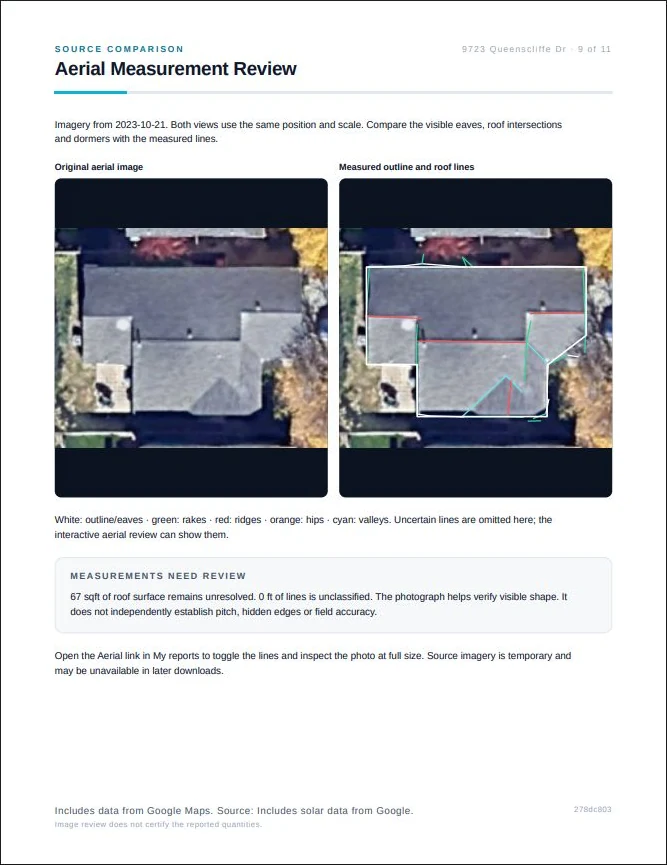
- Roof area, pitch and roof-line review
- Scope quantities, rates and itemized estimate PDFs
- A connected cash-bid handoff to Storm Cloud
SELECT THE ROOF
Put the property at the center of the estimate.
Find the property, select the roof and request its measurement report from the job or inspection.
Open the returned outline and measurement details in one report. Area, pitch, planes and roof-line information give your team a starting point for the scope.

MAKE THE NUMBERS USEFUL
Turn measurement detail into a scope you can explain.
Check the selected structures and report warnings, including unresolved edges or areas affected by tree cover. Confirm quantities, waste, materials and pricing before the estimate goes to a customer.
The right structure
Match the roof outline and included buildings to the work you are quoting.
The roof details
Review the returned area, pitch and roof-line measurements.
The complete scope
Bring measured quantities together with the materials and work the job needs.
BUILD THE CUSTOMER PROPOSAL
Put a price and a picture to the scope.
Enter or refine quantities, units and rates in HailSeek’s damage editor. The branded report can include cost estimates and itemized scope alongside the inspection photos and damage details.
Review the finished PDF, download it, and use the report-sharing tools to keep the customer or adjuster informed. The connected PenSnap contract workflow handles in-person, text or email signatures.
THE CONNECTED HANDOFF
Carry the quantities into Storm.
Use Send to cash bid on an accessible linked Storm project to create a cash-estimate draft for team review.
Continue with the scope and pricing in the draft, keeping the measurement as the starting point for the bid.
Can HailSeek create customer proposals and estimates?
Yes. Enter or refine quantities, units and rates in the damage editor on the phone or desktop. HailSeek uses those saved entries to create cost estimates and itemized scope in the company-branded PDF, alongside the inspection evidence. Review the scope, quantities, rates and finished document before presenting it to the customer.
Explore estimates and proposalsCan the homeowner sign through HailSeek?
Yes. The connected PenSnap contract workflow supports signing on the rep’s phone or sending a signing link by text or email. Desktop users can send by text or email. Review the agreement details and applicable template before sending; completed contracts are filed under Documents. Cash or retail agreements requiring price terms that this workflow cannot fill are completed through Storm Cloud or PenSnap.
What do roof measurement pulls cost?
HailSeek users get SatRoofs measurement pulls at $4 each, separate from the per-user company subscription. The savings calculator starts with 10 pulls per rep each month; choose Roofr, EagleView or Hover, then edit your report tier, volume and rate to compare monthly costs.
Compare measurement costsAre measurement results automatically ready for a final bid?
No. Review the roof outline, warnings, structures and quantities. Tree cover or unresolved edges can require attention. Confirm scope, waste, materials and pricing before a customer receives a bid.
Does a cash-estimate handoff need a Storm project?
Yes. Send to cash bid needs an accessible linked Storm project and does not create that project for you. Confirm the property and project link before sending measurements. This requirement applies to that connected handoff; HailSeek can generate its own inspection scope and estimate PDF without it.
BUILT FOR ROOFING COMPANIES
Bring the next job into HailSeek.
Start a 14-day company trial. Card required. Teams has a 2-seat minimum.